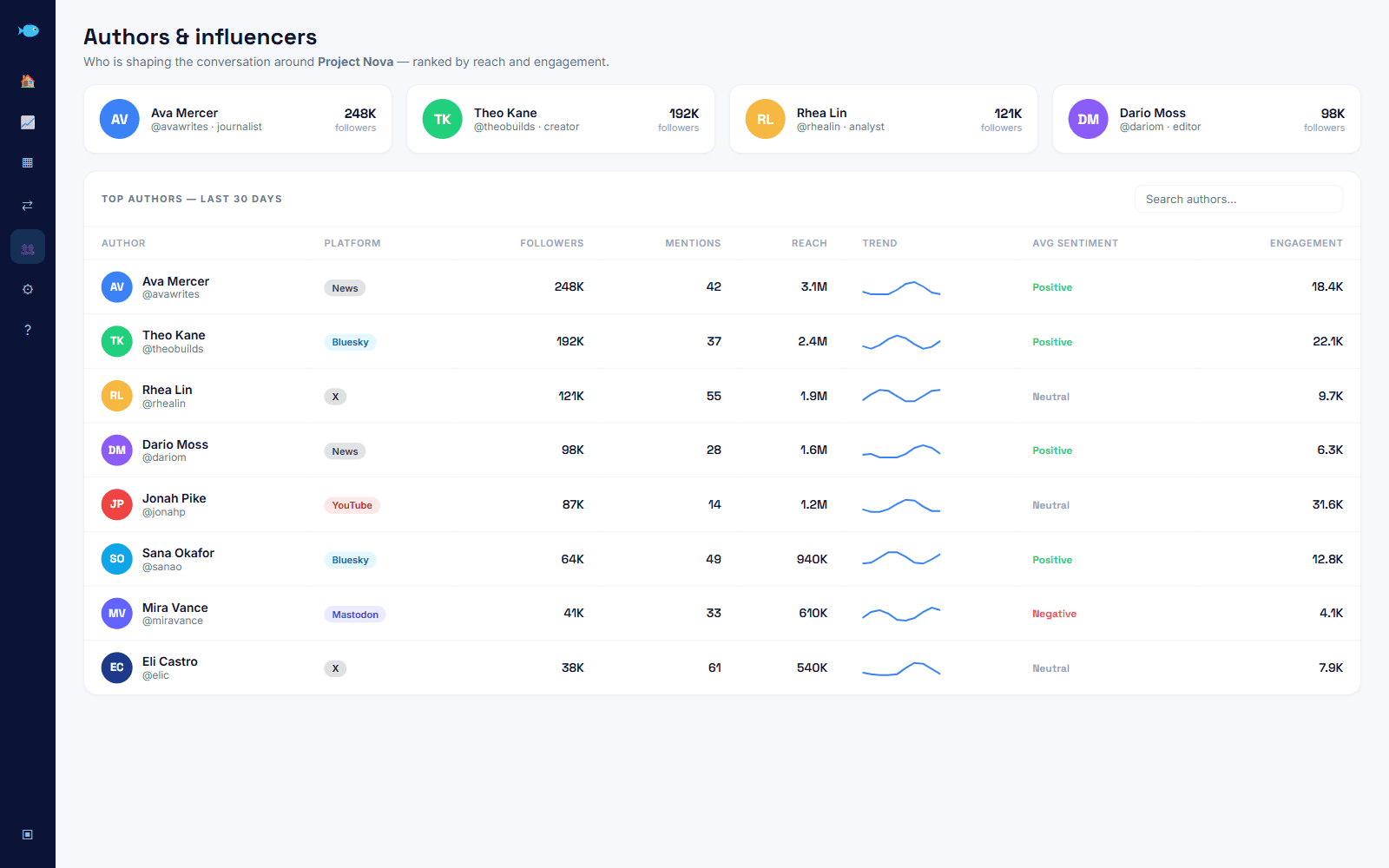
Most competitor tracking starts and ends with a bookmark folder: their pricing page, their changelog, maybe their blog. You check it when you remember to, which is rarely, and by the time you notice a change, so has everyone else who cares. There's a second source that updates faster than any of those pages, because it's written by people with no reason to be careful: the public conversation that shows you competitor activity as it happens, from the customer complaining their tool broke again to the founder announcing a feature nobody asked for.
This is a practical guide to watching that conversation instead of the pages. It covers what's worth tracking, how to set up a monitor that catches it without drowning you in noise, and a routine for turning what you find into something your team uses rather than a dashboard nobody opens after week one.
What competitor activity looks like in public conversation
Not everything worth knowing about a competitor sits on their own website. Some of the most useful signals only show up in what other people say:
- Launches and changes, often mentioned by users before the company's own announcement post gets much traction.
- Pricing complaints, which tell you exactly where their model is losing goodwill, in the customer's own words.
- Feature requests aimed at them, which double as a roadmap of what their product is missing.
- Comparison questions, like someone asking whether there's an alternative to a named tool. Whoever answers first, with something true, usually wins the reader's attention.
- Praise, which matters just as much as complaints. If people keep mentioning the same strength, that's the thing you need to match or beat, not ignore.
None of this requires reading every post yourself. It requires a monitor built to surface these specific shapes and get out of the way otherwise.
What should a competitor monitor watch for?
A monitor built around a competitor's name alone catches too much: news mentions, unrelated people with the same surname, old threads resurfacing. The useful version pairs the competitor's name with the words that show up around a real opinion, not just an appearance. In Babel42, that means a Boolean query such as the competitor's name and common misspellings, combined with words like "alternative", "switch", "instead of", "vs" or a specific complaint you already know they get, joined with OR and AND rather than left as one broad keyword. Quoted phrases keep exact product names intact, and a NOT clause drops the noisiest false positive once you spot it, so the monitor gets more precise the longer it runs rather than staying static from day one.
Set up the monitor, then add their own channel alongside it
Two pieces work together. The first is the keyword monitor above: your competitor's name and the surrounding language, refined with Boolean operators as you see what comes through. Babel42's query builder turns a plain-English description into that underlying search, which you can then tighten by hand.
The second piece is Channels, which follows an account directly rather than searching for mentions of it. Add your competitor's own profile and you get their posting cadence, follower growth and engagement over time, the things they control and publish themselves, sitting next to the keyword monitor that shows how people react to what they publish. One shows you their move; the other shows you whether it landed.
Group both under a keyword list for that competitor, so every chart and comparison in your dashboard can be sliced down to just them, or rolled up against every competitor you're tracking at once.
Read the category before you read the individual mentions
A single mention is a data point. A category comparison is context, and it's usually the faster way to spot that something changed. Babel42's share of voice view puts every brand you're tracking, yours and your competitors', side by side: total mentions, your percentage of the conversation, net sentiment, and how each has trended over the period.
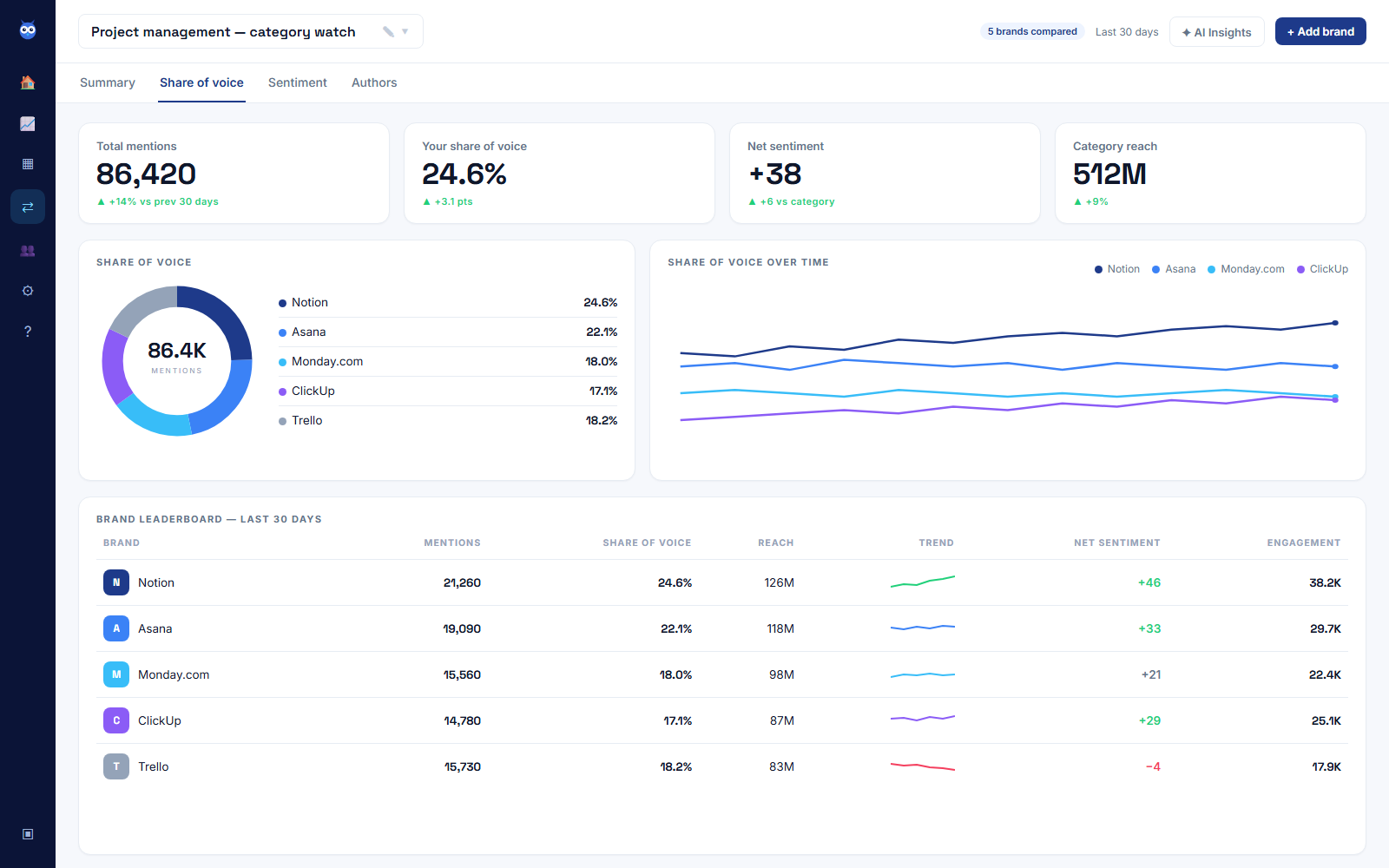
The screenshot above is a category watch across five project-management tools, not a customer's real account, but it shows the shape worth learning to read: one brand's share climbing while a rival's net sentiment turns negative in the same window is usually not a coincidence. Read a share figure knowing how lopsided posting is, though. According to Pew Research Center's "Contending with the 80/20 rule when studying online behavior", "the most active 10% of Twitter users produce 80% of all tweets from U.S. adults", so one prolific critic can move a competitor's line on their own. It is still a much faster read than scrolling a feed looking for the same pattern by eye. If your own share moves against the trend during a week a competitor made noise, that's worth a closer look at what they said.
Watch what they post, not just what gets said about them
The reactions to a competitor tell you how people feel. Their own account tells you what they're actually doing, which is worth tracking on its own.
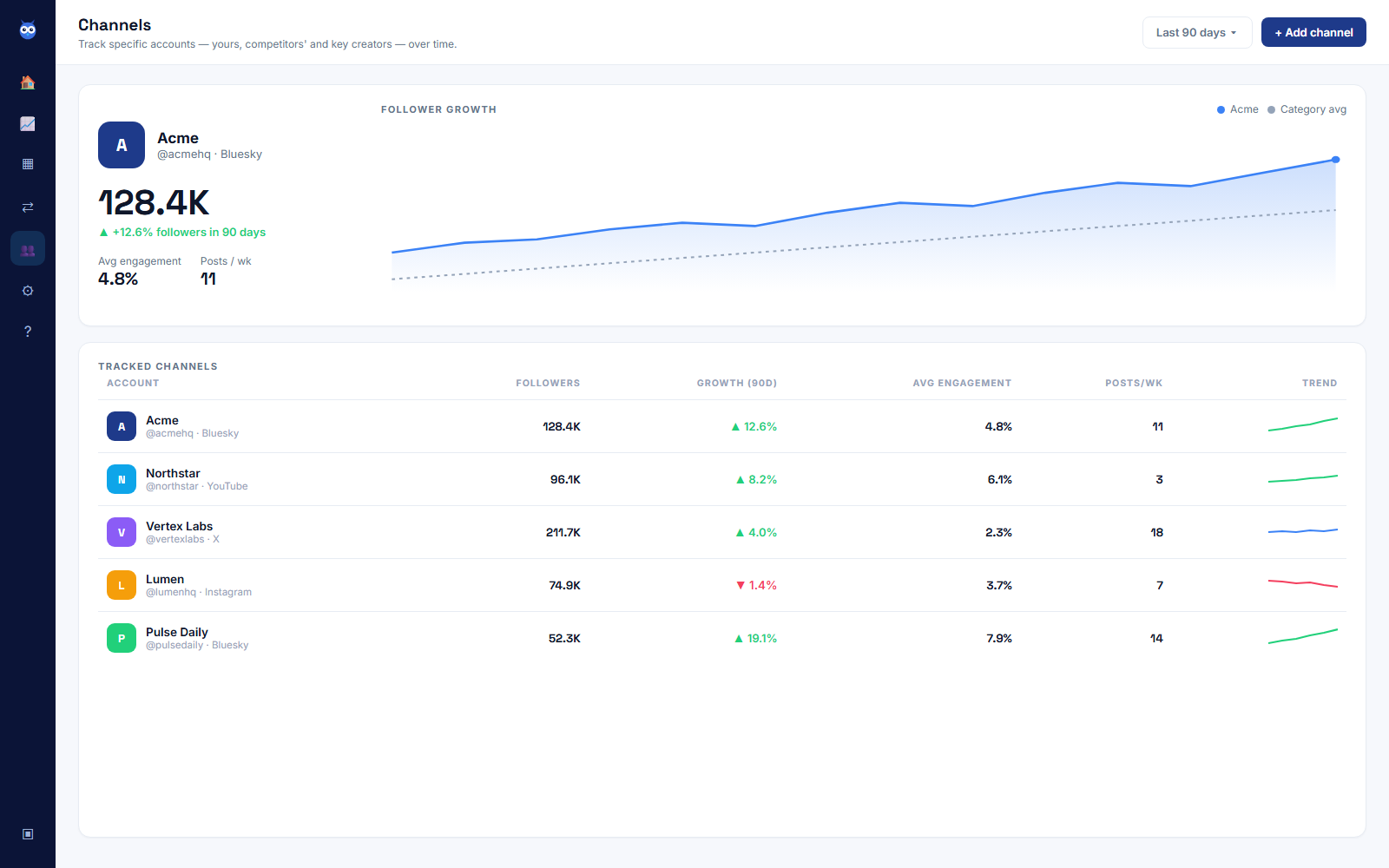
A posting cadence that suddenly doubles, or a follower growth curve that bends upward out of nowhere, usually means something is happening before it's fully public: a campaign, a launch, a partnership. You won't always know what from the numbers alone, but a sudden change is your cue to go check the keyword monitor for that same window and read what people are saying about it.
Turn what you see into three concrete responses
Watching is only useful if it changes something you do. Three responses come up often enough to plan for:
- Sales and messaging. A recurring complaint about a competitor is a talking point, but only if it's genuinely true of your product too. Don't lead with a strength you don't have.
- Content and comparison pages. If people keep asking "is there an alternative to X", that's a real, recurring question you can answer honestly, with a page or a post that helps someone deciding between the two.
- Product feedback. Feature requests aimed at a competitor are free user research about the whole category, not just their product. If three people wish a rival did something, that's worth a look regardless of who they were talking about.
A weekly routine that doesn't take over your week
Consistency beats intensity here, the same as with any other monitor:
- Once a week, ten minutes: check the share of voice view for anything that moved, and skim the Channels table for a sudden change in posting cadence or growth.
- As alerts arrive: Babel42 can notify you on a volume spike, a sentiment dip or a mention from a listed influencer, so a fast-moving thread about a competitor doesn't sit unread until your next check-in.
- Monthly, fifteen minutes: read back over what you noted and decide if anything belongs in sales messaging, a comparison page or a note to the product team.
That's under an hour most weeks, and it compounds. The pattern-matching (which competitor moves actually mean something, which are just noise) gets sharper the longer you keep at it.
What this gives you, and what still needs a phone call
Babel42 watches the public conversation about a competitor: social posts, news, forums, reviews and the platforms it covers, each reached on that platform's own terms, Bluesky's open firehose and Hacker News's open API at one end, X's per-request billing at the other. What you get from that is a faster, wider read of what is already being said in the open, which is where most competitive signal actually appears: a pricing complaint, a migration thread, a launch that lands flat. Communities behind a login, Reddit among them, are worth searching by hand alongside your monitors when your category lives there. Reddit in particular is a policy rather than an omission: its Data API Terms require a separate negotiated agreement for "commercial purposes, research in excess of rate limits, or for any use that is not expressly permitted". The internal roadmap and the real revenue number stay where they always were, in what people choose to say and in what you learn by asking customers directly, so keep the monitors for the pattern and the phone call for the detail.
On the free plan, you get 500 mentions a month, two monitors and one channel across five networks (Bluesky, YouTube, News, Hacker News and DEV.to), with 90 days of history and no card required. That's enough to run one competitor's keyword monitor and their channel side by side; tracking several competitors at once, or adding the extra networks, is where you'll want a paid plan. Either way, you can see whether this approach fits your category before spending anything.
If you haven't set up any listening yet, start with how to do social listening for free, which covers the first monitor this guide assumes you already have running. For the lead-generation side of watching competitors, specifically the complaints and comparison questions worth turning into outreach, see how to generate leads using social listening. And if you want the mechanics behind all of this, how social listening tools work under the hood walks through the collection and scoring pipeline that powers every dashboard in this post. If you're watching your own brand's standing rather than a named rival's, how to set up brand reputation monitoring covers the same setup applied to your own sentiment and mention trend, and how to measure brand awareness with social listening covers the separate, earlier question of whether anyone's talking about you at all. For the formula behind the share of voice number itself, and the two ways it can mislead you, see share of voice: how to calculate it, and what it misses. For a worked example of the same competitive read applied to a live public story, see which AI tool is actually winning the conversation online.